
A Real Workflow Engine, Without Writing Code
Beyond a drag-and-drop "flowchart": the RiverAI process designer is an engine that genuinely talks to your database, your email, and your external services.
A Ready-Made Block for Every Scenario
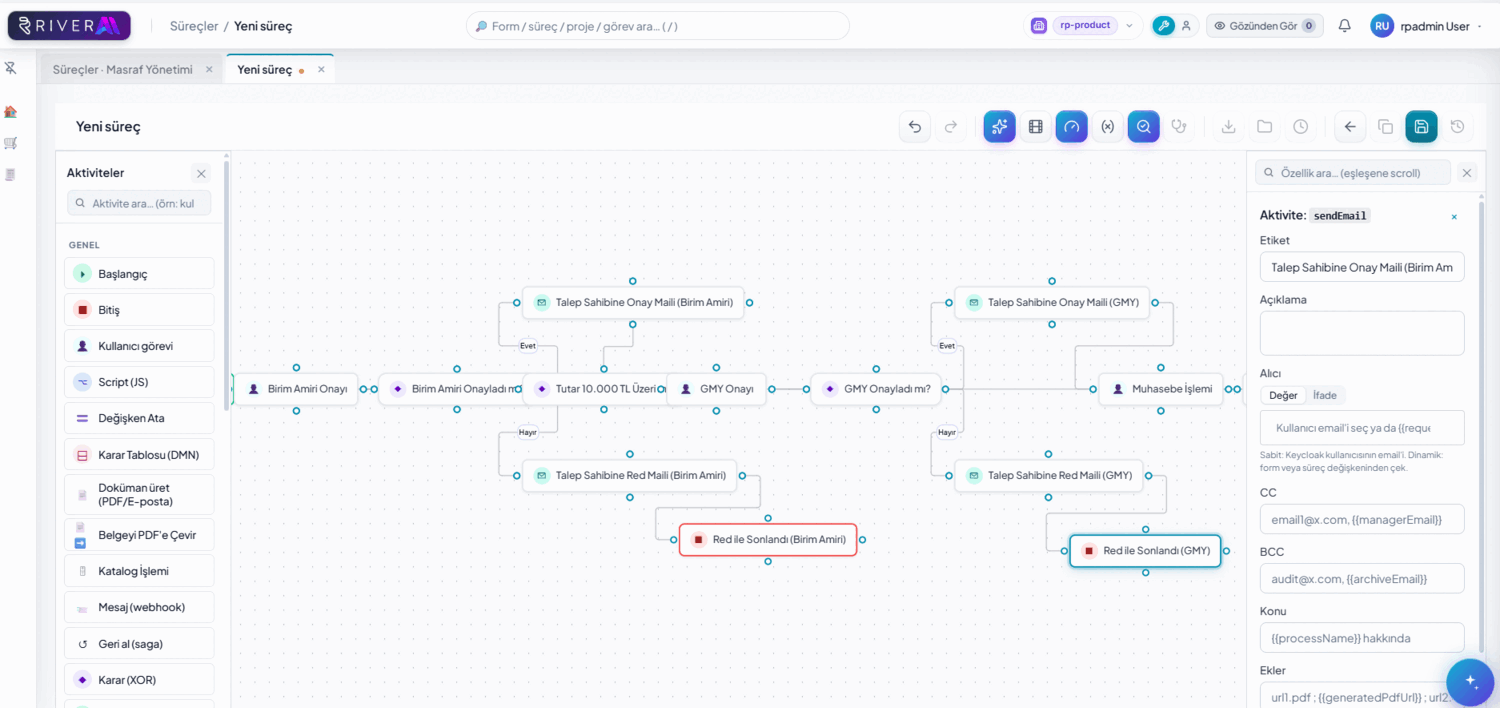
The RiverAI process canvas ships with more than 30 ready-made step types: human tasks (approve/reject, form filling), automatic condition/branching, parallel gateways (multiple branches advancing simultaneously and merging), timers (triggered after a duration or on a specific date), webhook/REST-SOAP calls, script steps, SQL/query steps, AI tasks, and sub-process invocation (triggering another process from within a process and waiting for its result). Each is an independent block that you drag onto the canvas and configure in its own property panel.
These step types connect to build real branching logic: in an expense approval process, for example, a condition step checks "does the amount exceed 5,000 TRY?"; if it does, a parallel gateway opens both the finance and the regional manager approvals at the same time, and once both complete they merge into a single "approved" branch. A timer step puts a rule like "if no response within 3 days, escalate to the senior manager" into effect without writing code.
The AI task step is particularly notable: summarizing the content of an email, classifying an incoming document, or automatically drafting an approval text can run directly as a step in the process flow, without setting up a separate integration; its output is used in subsequent steps just like a regular process variable.
Schema Tree: Click, and the SQL Is Generated
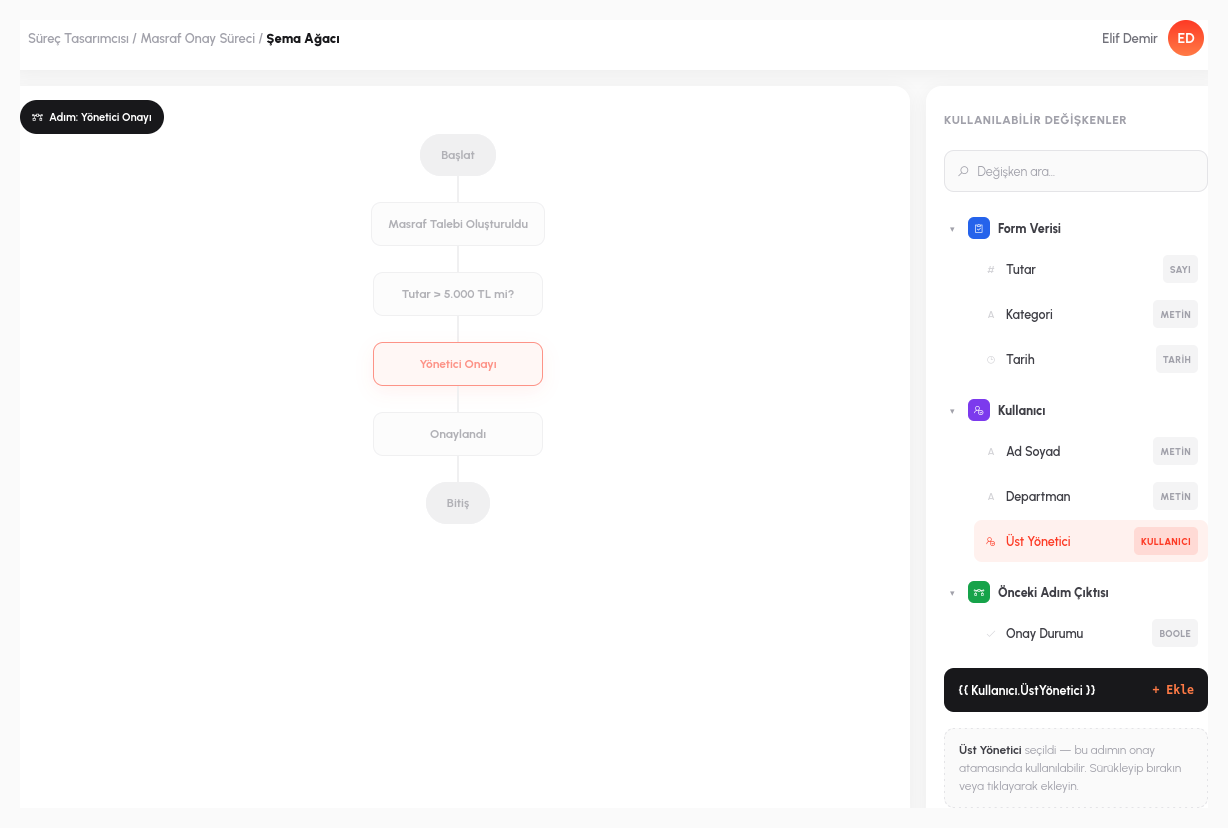
When you add a SQL or MongoDB step, the table and column tree of the connected database appears in front of you. Find the table you're looking for, click the column, and the query is generated automatically; the designer doesn't need to be a SQL expert. But this tree does more than show the database schema. In the same panel, all the variables collected in the process so far are also listed live: a field from an earlier form, the result produced by a previous step, the process's own context (who started it, on what date). All of it appears in the tree and can be added to the query with a click.
This makes it unnecessary for the designer to keep every variable name in their head: when writing an email body 15 steps in, instead of remembering the "onaylayan_adi" variable returned by a SQL query 3 steps earlier, you simply find it in the schema tree and click it. The same live tree can be used in exactly the same way in email templates, script steps, and condition expressions.
Variable sources are not limited to the process itself: from within a script step you can query your organization's user directory directly (who reports to whom, which department someone is in), and you can use the result returned by a SQL step to determine who the next approval step is assigned to. All of this is defined on the canvas, without writing separate integration code.
Test First, Then Publish
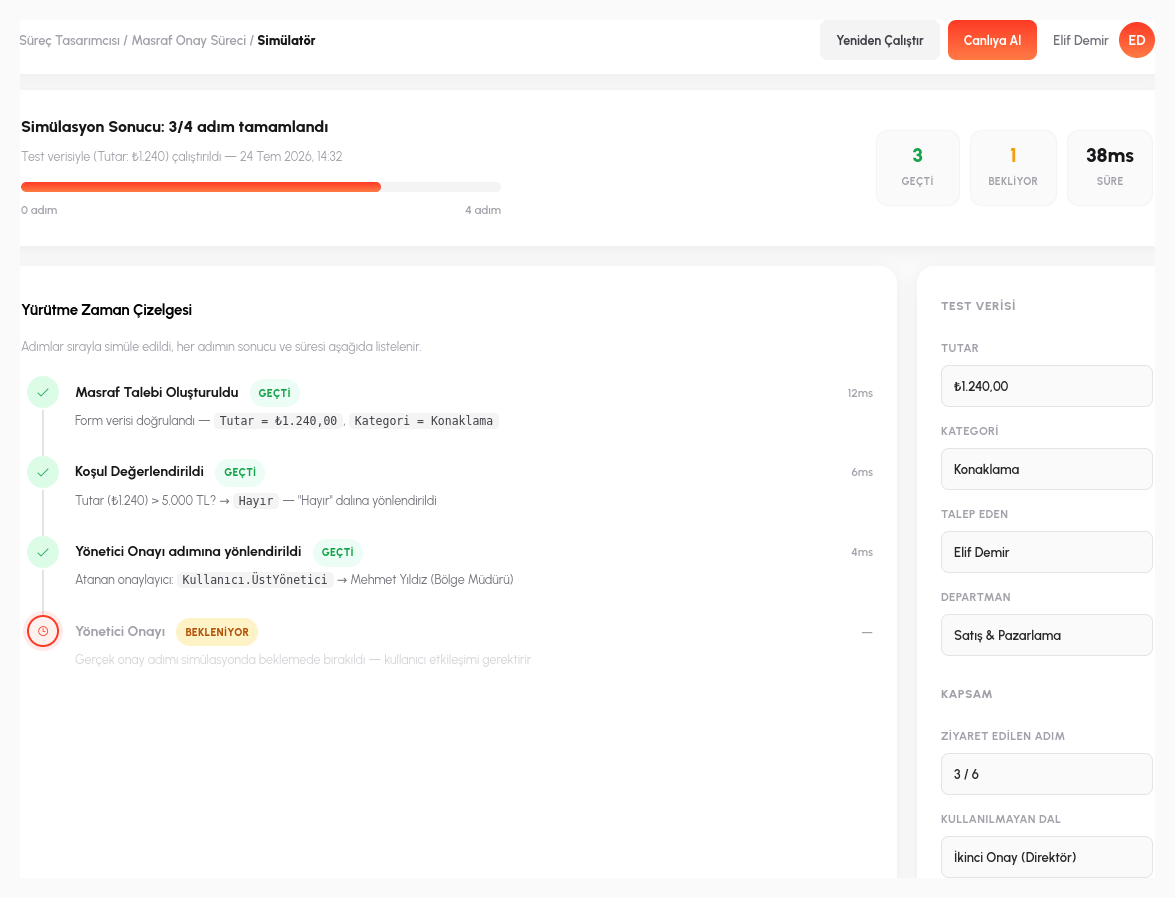
Every process instance automatically knows who started it, which step it is on, and which user is currently acting on it, and all of these are available everywhere as process-specific variables. You don't have to guess this behavior before publishing: you run a step-by-step simulation with real data, and the simulator screen shows which branch the condition step took, when the parallel gateway merged, and which variable held what value at which step.
This lets you catch mistakes before they reach production, especially in complex branching processes: if you set up the "second approval if the amount exceeds 5,000 TRY" rule incorrectly, you can try a value right at the boundary (exactly 5,000 TRY) in the simulation and see whether it goes down the branch you expected, with test data rather than an employee's real request in production.
Process definitions are also versioned: when you update and publish a process, the old version isn't deleted; it's archived and can be rolled back to when needed. And when two designers edit the same process at the same time, neither is left in the other's blind spot: thanks to SignalR-based real-time collaborative design, you see the other person's cursor and their in-progress change instantly on the canvas, and two people editing the same step at the same time is prevented from clashing.
- 30+ Working Step Types: human tasks, condition/branching, parallel gateways, timers, webhook/REST-SOAP, script, SQL, AI tasks, and sub-process invocation; all are blocks that you drag-and-drop onto the canvas and that genuinely work.
- Live Schema Tree: in a SQL/MongoDB step, the database tables and columns and all process variables collected so far are listed in the same panel and added to the query with a click.
- Step-by-Step Simulation: before publishing, a simulation runs with real data; which branch was taken and which variable held what value is seen with test data.
- Versioning: when a process is updated and published, the old version isn't deleted; it's archived and can be rolled back to when needed.
- Real-Time Collaborative Design: with SignalR, two designers editing the same process at the same time see each other's cursor and changes instantly on the canvas, and conflicts are prevented.
Let's Build Your Own Process Together
In a 15-minute demo, let's design one of your real processes live in RiverAI.
Request a Demo